

Tableau is a leading data visualization tool used by organizations worldwide to transform raw data into interactive and insightful graphical depiction.
Tableau - Basic to Advance Visualization with Certification (Excel Free)
Download Brochure
Get Quick Call Back Explore Course


Training By Industrial Expert

Placement upto 40 LPA

Flexible Learning Options

Career Mentorship & Job Placement
Course Overview
In today’s data-driven business environment, organizations rely heavily on visual analytics and interactive dashboards to make faster and smarter decisions. Raw data alone is often difficult to understand, which is why companies use modern visualization tools to convert complex datasets into meaningful reports and business insights. Tableau has emerged as one of the most powerful and widely used data visualization platforms for creating interactive dashboards, performance reports, and analytical presentations. Our Data Visualization using Tableau training program is designed to help learners understand how modern businesses use data visualization to improve analysis, reporting, and decision-making processes.


Data Visualization using Tableau
Tableau is a leading data visualization tool used by organizations worldwide to transform raw data into interactive and insightful graphical depiction. Tableau visualization training refers to specialized courses and workshops designed to equip individuals with the skills needed to leverage Tableau for effective data analysis and presentation. . Through hands-on learning, interactive exercises, and real-world projects, participants will gain proficiency in creating impactful visualizations, interactive dashboards, and compelling data stories. Whether you’re a novice looking to delve into the basics or an experienced user aiming to refine your skills, our course provides a structured pathway to master Tableau and elevate your data visualization capabilities.

Tableau Visualization Course Detail
It is one of the powerful and fastest growing data visualization tool used in the business industry. It facilitates in simplifying raw data into the format that is easy and simple to understand. At present, this tool is being used in the BI industry.
Takeaways
- Tableau tools
- Practical implementation
- Projects
- Tableau complete understanding
- Tableau practicals from day 1
- Interview preparation

Tableau Visualization Course Highlights
It is one of the powerful and fastest growing data visualization tool used in the business industry. It facilitates in simplifying raw data into the format that is easy and simple to understand. At present, this tool is being used in the BI industry.
Takeaways
- Tableau tools
- Practical implementation
- Projects
- Tableau complete understanding
- Tableau practicals from day 1
- Interview preparation
Who Should Enroll:
- Data Analysts
- Business Intelligence Professionals
- Data Scientists
- Data Engineers
- Students

Programming Tools & Language


Online Classes
we offer both online and offline classes with a strong focus on technical skills, real-world tools, and industry-relevant projects—allowing you to learn at your own pace, anytime, anywhere.

Weekdays Classes
weekly classes led by industry experts, focused on real-time projects and only the most relevant tools and topics—no fluff, just job-ready skills.

Weekend Classes
weekend classes designed for working professionals, making it easy to upskill without disrupting your job. Learn directly from industry experts through real-world projects and practical tools that fast-track your growth.


Don't Just Take Our Word For It. See How TrainingYA Transformed Lives

Pramod Singh
The Business Analytics course at TrainingYA (Earlier CTC) Data Science Training Institute provided me with knowledge of the industry demanded tools. Along with this, I get an opportunity to practice my skills through various assignments and case studies that are given to us in the workshops and classes. The trainers start the course with basic classes which gave us an introduction to the various tools. I have been very satisfied with my learning experience so far with TrainingYA.

Yushant Karki
The faculty members at TrainingYA are very supportive. I had joined their 360 Degree Data Science course as I was a fresher from a non-technical background who wanted an in-depth knowledge of the field of Data Science. They started all the concepts right from the basics which I was able to get a hold of easily. Their workshops made it even easier for me to understand all the concepts as I got hands on experience. I am still learning at the institute and hope I can get placed with their help just like the others whom I have seen getting placed.

Aman Rawat
TrainingYA (Earlier CTC) helped me a lot to enhance my skillset. I learned different tools here and as I was a newbie in this field so they started from the very basic for better understanding. The best thing about TrainingYA is that they focus on market trend and practical knowledge so that one can easily get in the industry even if they are not from the technical background. I have seen fresher’s and experienced people from various backgrounds get jobs into the world of Data Science with the help of TrainingYA. The best part if you can go as per your own speed. They truly know who to turn a profile around.

Tanya Hora
I would very much like to recommend TrainingYA (Earlier CTC) Data Science institute to everyone looking for a transition. I joined this institute recently and have been every happy with the learning. They are very dedicated towards practical knowledge and focus on the same through case studies and assignments. Along with this they conduct mock interviews to prepare us for the placement interviews. I am very satisfied with their training program. They have got some of my classmates placed in just 2 months from joining. I am going through the placement process as of now and I am hopeful that I will so get placed too. My college friend who recommended me this institute is already placed in Vortex organisation in just 45 days after joining. I am very optimistic and thank for TrainingYA for all their efforts.

Yatin Wasen
I believe that TrainingYA (Earlier CTC) institute is the best training institute for Data Science. I joined their 360-degree Data Science Course as I did not belong to a technical background and still wanted an in depth knowledge of the Data Science field. TrainingYA provided me with relevant and practical knowledge through workshops, case studies and assignments. They helped me throughout my transition period from Commerce background to the Data Science world. The faculty members were all experienced and very supportive. They were all working professionals and had experience of 8+ years. So their way of teaching gave us an insight into how things actually happen in the industry. I got my first offer within 1.5 months of joining the course. Currently, I have not completed the course. But I have already been placed through the course. Within completing only 30% of the course I had got 3 offers. So, I would recommend everyone who wishes to have a transition in their career to join TrainingYA Institute they truly helped me a lot.

Manisha Sardana
Hi I recently joined TrainingYA, the Data Science Institute because I was looking for a top-notch program that would teach me how to use data in a real-world setting. I’m so glad I found the Institute at Gurugram. The faculties at this Institute are some of the best in the industry, and they’ve been incredibly supportive. I will surely recommend this to all.
Your Journey: From Learning to Earning
Explore More Courses
Join our industry-oriented courses to build high-in-demand career skills for a brighter future!
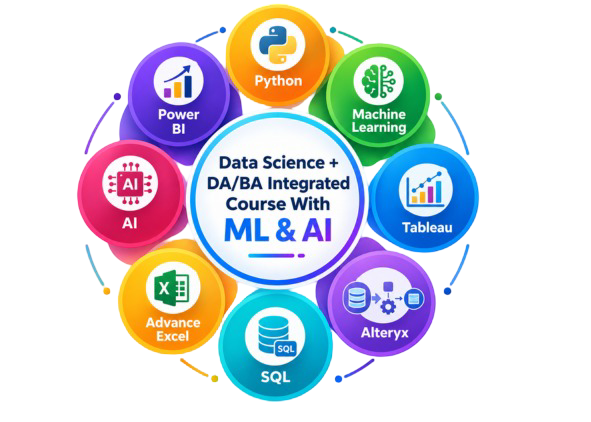
Data Science + DA/BA Integrated Course With ML & AI

Data Analytics/BA with Tableau + Power BI + SQL + Excel

Python Analytics with Machine Learning
(SQL + Excel free)

R Analytics with Machine Learning (SQL, Excel Free)

Tableau - Basic to Advance Visualization with Certification (Excel Free)


Advance Excel Training (Everything Else but VBA Coding)


Frequently Asked Questions
Data visualization using Tableau involves connecting data sources, organizing datasets, creating charts and graphs, and designing interactive dashboards to present business insights visually. Tableau helps users analyze large datasets and convert complex information into easy-to-understand visual reports.
Tableau is a leading business intelligence and data visualization tool used to create interactive dashboards, reports, charts, and analytical visualizations. It helps organizations analyze data efficiently and make data-driven business decisions.
To create a dashboard in Tableau, users first connect a dataset, build multiple worksheets or charts, and then combine those visualizations into a dashboard layout. Filters, actions, and interactive elements can also be added to improve user experience and data analysis.
A calculated field in Tableau is created by using formulas and expressions to generate new data values from existing datasets. Users can create calculated fields for custom metrics, ratios, conditional logic, and advanced data analysis.
Power BI and Tableau are both popular data visualization tools, but Tableau is widely known for advanced visual analytics and interactive dashboard capabilities, while Power BI is commonly preferred for Microsoft ecosystem integration and cost-effective business reporting solutions.
Yes, Tableau is considered beginner-friendly because of its drag-and-drop interface and visual dashboard creation features. With proper practice and structured learning, beginners can quickly understand Tableau basics and gradually move toward advanced visualization techniques.
Metadata in Tableau helps organize and manage information about datasets, fields, calculations, and data relationships. It improves data understanding, consistency, and efficiency while building dashboards and reports.
Data Visualization using Tableau refers to the process of analyzing and presenting data through charts, dashboards, graphs, and interactive reports using Tableau software. It helps businesses understand trends, patterns, and insights more effectively.
Students, business analysts, working professionals, marketers, finance professionals, and aspiring data analysts can learn Tableau. Even non-technical learners can start with Tableau because of its simple and user-friendly interface.
Learning Tableau helps professionals improve reporting skills, create interactive dashboards, analyze business data efficiently, and enhance career opportunities in analytics, business intelligence, and data visualization domains.
Yes, Tableau is a highly valuable skill in India because companies across industries are increasingly adopting data visualization and business intelligence tools for reporting, analytics, and decision-making processes.
Tableau is widely used in industries such as healthcare, banking, retail, e-commerce, finance, education, logistics, marketing, and information technology for business analytics and reporting purposes.
The salary of a Tableau Developer in India depends on skills, experience, company, and location. Skilled Tableau professionals often receive competitive salary packages due to growing demand in analytics and business intelligence roles.
Yes, non-technical students can learn Tableau because it does not require advanced coding knowledge. Beginners can easily create dashboards and visual reports using Tableau’s drag-and-drop functionality.
Tableau is important for Data Analytics because it helps professionals analyze large datasets quickly, identify trends, create interactive dashboards, and communicate business insights visually for better decision-making.
The duration of a Tableau course varies depending on the curriculum and learning mode. Most professional Tableau training programs range from a few weeks to several months based on the depth of learning and practical projects included.